
Create Smarter

Text Images Video with AI

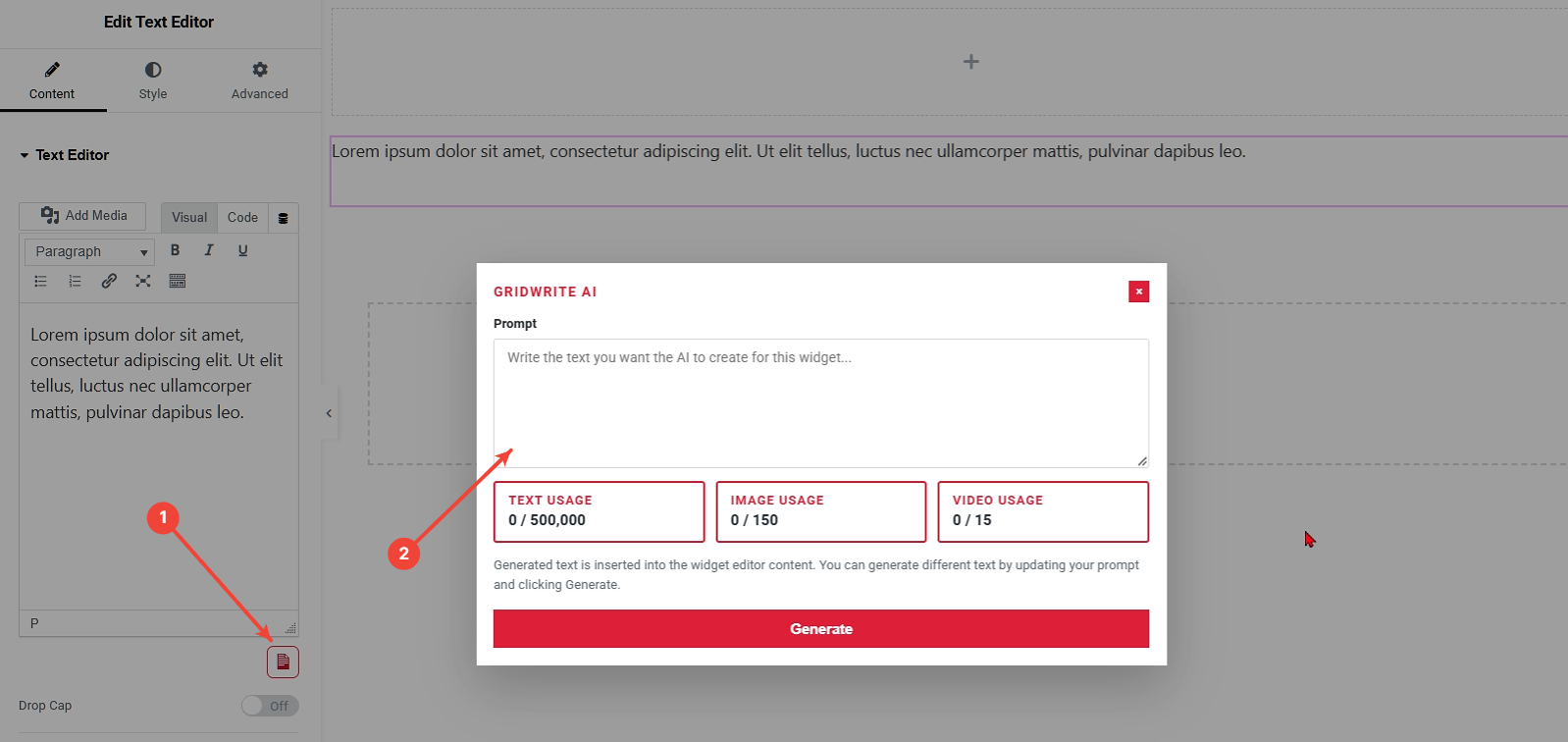
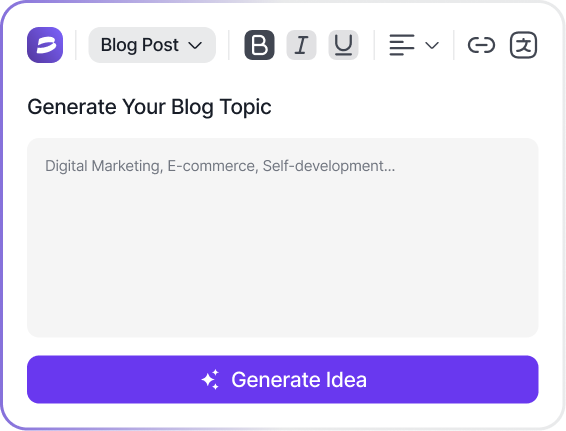
Create and edit website content with AI directly inside GridWrite—generate text, images, video, icons, and structured content without leaving your visual workflow.

  • Open AI
  • Google Ads
  • HubSpot

 Trusted by 100,000+ marketers, writers, and entrepreneurs

Core Capabilities

Create More with GridWrite AI

Generate and edit the content your website needs—text, images, video, icons, and structured items—directly inside the visual editing workflow.

Grid365 Elements New72x72
  • Headings
  • Paragraphs
  • Descriptions
  • Button Labels
  • Widget Text
Text & Headings

Generate, rewrite, and refine headings, paragraphs, descriptions, and other text directly inside eligible GridWrite controls.

AI Image Generation
Create new visuals or replace existing images without leaving the GridWrite workflow.
Integrated Media Workflow
%100
Images

Generate and replace images from GridWrite controls or the Media Library while keeping your page editing workflow in one place.

  • Page Video
  • Media Library
  • Visual Content
  • AI Generation
Video

Generate video from supported GridWrite controls and the Media Library for richer website content.

  • Widget Icons
  • Control-Level AI
  • Reusable Visuals
  • Immediate Apply
  • Undo Friendly
  • Visual Editing
Icons

Use GridWrite AI to generate and apply icon content inside eligible widget controls without breaking your editing flow.

  • Generate multiple content items in one workflow.
    1
  • Populate text, image, button, and icon fields where supported.
    2
  • Apply generated content directly to the visual editor.
    3
Repeater & Structured Content

Generate multiple structured items inside supported repeater controls, including combinations of text, images, buttons, icons, and other eligible fields.

Built Into the Workflow

AI Inside Your Editor Where You Already Work

GridWrite puts AI beside the controls you already use, so you can generate, apply, and refine content without leaving the visual editing experience.

Control-Level AI

Use AI beside eligible text, image, icon, and other supported controls instead of switching to a separate writing screen.

Generate, Apply & Keep Editing

Generated content is applied directly to the editor so you can continue working without a publish-and-refresh cycle.

Media Library Generation

Create images and video from the Media Library when you need new visual content outside an individual page control.

Integrated Solutions

Power Up Your Content with AI Integrations

Enhance your writing with seamless AI integrations. Connect to leading tools for creative content, grammar perfection, multilingual support, and SEO optimization—all in one place.

Smart Personalization

Dynamic Templates & Customization

All Blog & Articles Email Marketing Social Media Content Video & Multimedia Scripts Website & SEO Content

TikTok Hook Sentence Starter

Kickstart your TikTok videos with catchy hook lines that increase…
Explore Now

FAQ Schema Generator (JSON-LD)

Generate Google-compliant FAQ schema markup to improve SERP appearance.
Explore Now

Product Description (E-Commerce)

Write compelling product descriptions optimized for search engines and conversions.
Explore Now

Landing Page Intro Text

Generate captivating introductions for your landing pages that drive user…
Explore Now
Show More
Testimonials

Real Stories, Real Results

Real success stories from businesses using our AI copywriting tool to scale faster and convert better.

Pricing Plans

Flexible Plans for Every Creator

Start for free. Upgrade anytime. No hidden fees.

Monthly Annual – Save 20%
Free Plan
$0/month

Best for personal use, students

Start Free
Pro Plan
$29/month

Best for freelancers, small businesses

Upgrade to Pro
Enterprise Plan
Custom

Best for large teams, agencies

Contact Us
Free Plan
$0/year

Best for personal use, students

Start Free
Pro Plan
$299/year

Best for freelancers, small businesses

Upgrade to Pro
Enterprise Plan
Custom

Best for large teams, agencies

Contact Us
GridWrite FAQs

Got Questions?
We’ve Got Answers.

Quick answers about using GridWrite AI for text, images, video, icons, structured content, and your editing workflow.

1. What can I create with GridWrite AI?
GridWrite can generate and edit text, headings, images, video, icons, and structured content inside supported controls.
2. Where do I access GridWrite AI?
GridWrite AI appears directly beside eligible controls in the visual editor, so you can generate content without leaving your workflow.
3. Can GridWrite generate images and video?
Yes. You can generate images and video from supported GridWrite controls and from the Media Library.
4. Does GridWrite work with repeater and structured content?
Yes. Supported repeater controls can generate multiple items containing combinations of text, images, buttons, icons, and other eligible fields.
5. Where can I find help using GridWrite?
The GridWrite Help Center includes guides for text, images, video, repeater items, Media Library generation, prompting, usage, and troubleshooting.
Cart (0 items)

Create your account

Select the fields to be shown. Others will be hidden. Drag and drop to rearrange the order.
  • Image
  • SKU
  • Rating
  • Price
  • Stock
  • Availability
  • Add to cart
  • Description
  • Content
  • Weight
  • Dimensions
  • Additional information
Click outside to hide the comparison bar
Compare